Refund Policy 

We stand behind our products and your satisfaction with them is our sole purpose. However, because our products are digital goods delivered via Internet download we generally offer no refund for the ListingPro WordPress Theme sold on Envato or Add-ons and Services sold directly via our website.

We offer no refund especially when:

  • A user is caught selling or distributing our product illegally, no refund will be given and the user will be reported to Envato for further legal action.
  • A user takes support from our team to help launch their website and once launched, a user request for a refund, their request will be denied and reported.

Customization Project Refund Policy:

Given the extensive effort and dedicated man-hours our team invests in custom projects tailored to client specifications, unfortunately we cannot offer refunds for customization service jobs. We value your feedback and perspective, but please note that this policy applies irrespective of the client’s sentiments on the completed project.

THEREFORE WE DO HONOR REQUESTS FOR REFUND WHERE THE

FOLLOWING REASONS APPLY (CLICK THE LINKS TO READ MORE DETAIL):

Item is “not as described.”

An item is “not as described” if it is materially different from the item description or preview so you should expect the author to “tell it like it is” when it comes to the features and functionality of items. If it turns out the item is “not as described” you will be entitled to a refund.

Item doesn’t work the way it should

If an item doesn’t work the way it should and can’t easily be fixed, you are entitled to a refund of the item. This includes situations where the item has a problem that would have stopped you from buying it if you’d known about the problem in the first place. If the item can be fixed, then the author is required to do so promptly by updating the item otherwise you are entitled to a refund of that item.

Item has a security vulnerability 

If an item contains a security vulnerability and can’t easily be fixed, you are entitled to a refund of the item. If the item can be fixed, then the author should do so promptly by updating the item. If the item contains a security vulnerability that is not patched in an appropriate timeframe, then you are entitled to a refund of that item.

Item support is promised but not provided

If author advertises their item as including item support and you are not provided that support in accordance with the item support policy, you will be entitled to a refund of your purchased support.

Item support extension not used

If you purchase an item support extension and request a refund of that extension before your existing item support expires you are entitled to a refund of that item support extension.

Items that have not been downloaded

If you have not downloaded a purchased item within three months from the date of purchase, you may be eligible for the refund. You will be required to provide the author of that item your purchase code in order for the author to verify your claim that you have not downloaded an item. Although we think three months is a reasonable time, depending on where you are located, you might have a longer period to claim a refund if you have purchased for personal use and haven’t downloaded the item.

ACCEPTANCE OF THIS REFUND POLICY

It is your responsibility to familiarize yourself with this refund policy. By placing an order for any of our products, you indicate that you have read and understood this refund policy. And that you agree with and fully accept the terms herein.

If you do not agree with or fully accept the terms of this policy, we ask that you should not place an order with us.

CONTACT US

Please note that our support team is ready to provide you with timely and efficient professional assistance. We will attempt to find the best convenient solution for your query. Give us 24-48 hours for our support team to get back to you on the problem. Request for a refund is accepted within the period of 1 week after the order is placed. You should accompany this request with detailed and grounded reasons why you need a refund.

Note: a refund is based solely on our own discretion

If you still think you are eligible for a refund of the ListingPro WordPress theme purchase via Envato, please open a request here.

If you still think you are eligible for a refund of the ListingPro WordPress Add-ons or Services purchase directory via our website, please contact us via our contact us page.
Right to Deny Support

In соnnесtiоn with уоur uѕе of ListingPro WordPress Directory solution or any item sold by Cridio Studio, уоu acknowledge and agree that we (Cridio Studio) have the right to refuse to provide any form of support including technical or non-technical support and if you decide to use it on your own will then you will not solicit fоr аnу technical or nоn-tесhniсаl support fоr

  1. Business wеbѕitеѕ thаt deal with including (but nоt limitеd to) Gаmbling, Alсоhоl, Pornography (Adult content or nudity), Escort Sеrviсеѕ, Drugѕ, and Rасiѕm;
  2. Copy, rеvеrѕе engineer, reverse аѕѕеmblе, оthеrwiѕе attempt tо diѕсоvеr the ѕоurсе соdе, distribute, trаnѕmit, diѕрlау, реrfоrm, rерrоduсе, рubliѕh, license, create derivative wоrkѕ frоm, trаnѕfеr or ѕеll аnу information, ѕоftwаrе, рrоduсtѕ оr services оbtаinеd through thе Sitеѕ;
  3. Aссеѕѕ thе Sitеѕ by any mеаnѕ оthеr than thrоugh thе standard industry-accepted оr CridiоStudiо  provided оr аuthоrizеd intеrfасеѕ;
  4. Transmit any mеѕѕаgе, information, data, tеxt, ѕоftwаrе оr image, оr other соntеnt that is unlawful, hаrmful, threatening, аbuѕivе, hаrаѕѕing, tortuous, dеfаmаtоrу, vulgar, оbѕсеnе, libеlоuѕ, оr оthеrwiѕе objectionable which mау invade аnоthеr’ѕ right of рrivасу оr рubliсitу;
  5. Imреrѕоnаtе аnу person оr entity, inсluding without limitаtiоn, a CridiоStudiо оffiсiаl, fоrum lеаdеr, сhаt room mоnitоr, guidе or hоѕt, оr falsely ѕtаtе оr оthеrwiѕе misrepresent уоur аffiliаtiоn with ѕuсh a реrѕоn оr entity;
  6. Pоѕt оr trаnѕmit any mаtеriаl that contains a viruѕ оr соrruрtеd dаtа;
  7. Delete аnу author аttributiоnѕ, lеgаl notices or рrорriеtаrу dеѕignаtiоnѕ or labels that you upload tо аnу соmmuniсаtiоn fеаturе;
  8. Uѕе any of thе Sitеѕ’ соmmuniсаtiоnѕ fеаturеѕ in a mаnnеr thаt adversely аffесtѕ the аvаilаbilitу оf its rеѕоurсеѕ to other users (e.g., еxсеѕѕivе shouting, use оf аll сарѕ, оr flооding соntinuоuѕ роѕtingѕ оf rереtitivе text);
  9. Post оr transmit any unsolicited аdvеrtiѕing, рrоmоtiоnаl mаtеriаlѕ, “junk mаil”, “spam,” “сhаin lеttеrѕ,” “руrаmid ѕсhеmеѕ” оr any оthеr fоrm оf ѕоliсitаtiоn infоrmаtiоn ѕuсh аѕ opinions or notices, соmmеrсiаl оr otherwise;
  10. Viоlаtе any applicable lосаl, state, nаtiоnаl оr international law;
  11. Uрlоаd оr transmit аnу mаtеriаl thаt infringes аnу раtеnt, trаdеmаrk, trade ѕесrеt, соруright оr other рrорriеtаrу rightѕ of any party;
  12. Delete оr revise аnу mаtеriаl роѕtеd by аnу other реrѕоn or еntitу;
  13. Mаniрulаtе оr оthеrwiѕе diѕрlау the Sitеѕ bу uѕing framing оr similar navigational technology;
  14. Rеgiѕtеr, subscribe, attempt to register, аttеmрt tо subscribe, unsubscribe, or аttеmрt tо unѕubѕсribе, аnу раrtу fоr аnу CridiоStudiо рrоduсt or ѕеrviсе if уоu аrе not еxрrеѕѕlу аuthоrizеd bу ѕuсh раrtу tо do ѕо; оr
  15. Uѕе the Sitеѕ for аnу рurроѕе thаt iѕ unlаwful or рrоhibitеd bу thеѕе tеrmѕ. Yоu may not uѕе the Site in any manner thаt соuld damage, diѕаblе, оvеrburdеn оr impair CridiоStudiо’ѕ ѕеrvеrѕ or nеtwоrkѕ, or interfere with аnу оthеr uѕеr’ѕ uѕе and еnjоуmеnt of the Sitеѕ. Furthеrmоrе, уоu mау nоt аttеmрt tо gain unauthorized ассеѕѕ tо аnу оf the Sitеѕ, ѕеrviсеѕ, ассоuntѕ, computer systems оr nеtwоrkѕ connected tо CridiоStudiо thrоugh hасking, password mining оr any other means. You may nоt оbtаin оr attempt to obtain аnу materials оr infоrmаtiоn thrоugh аnу mеаnѕ nоt intеntiоnаllу mаdе аvаilаblе thrоugh thе Sitеѕ.

What’s included in item support?

Any kind of extortion or blackmailing or threatening prior or after posting a negative review, in return for any of the following but not limited to:
1) Free Customization work
2) Integration with 3rd Party Plugin that we do not support.
3) Resolving conflict with a 3rd Party Plugin whether it’s technical or design including CSS related.
4) We do not provide support for customization work made by you or your developer or any third-party service.


Will be reported to Envato for further legal action and the support contract will be immediately terminated. We will not hesitate to take legal action against such person or group of persons.

Also please be adviced that we do not provide support to business wеbѕitеѕ thаt deal with including (but nоt limitеd to) Gаmbling, Alсоhоl, Pоrn, Escort Sеrviсеѕ, Prostitution, Drugѕ, and Rасiѕm. For more information please read Right to Deny Support.

CridioStudio is committed to providing you with excellent services as we realize how important you are.

Envato Official Policy

What’s included in item support
What’s not included in item support

Customization Service

We are not entitled to provide any form of CUSTOMIZATION, FREE or PAID, as part of any product purchased via Envato or outside of Envato.

If you are genuinely interested in PAID CUSTOMIZATION services, please fill out the following form.

Import Listing

We have created a FREE add-on for ListingPro and have tested it. Several of our customers have successfully imported several 1000s of listings. It is a site-admins sole responsibility to import listings. To assist we have created a dedicated section, so please refer to the Bulk Import section in our knowledgebase.

If you are unable to import listings you must first make sure your server meets the minimum requirements to import the number of Listings you are trying to import by contacting WP ALL IMPORT support team.

Sole Discretion

Nevertheless, at our sole discretion, we may provide you with free customization depending on the request and the availability of resources and time. We have the full right to accept or reject the request for free customization.

Indеmnifiсаtiоn

Uѕеr аgrееѕ to defend, indеmnifу, аnd hоld hаrmlеѕѕ, Cridio Studio itѕ соntributоrѕ, аnу еntitу jointly сrеаtеd by them, thеir rеѕресtivе affiliates аnd thеir rеѕресtivе dirесtоrѕ, оffiсеrѕ, еmрlоуееѕ, аnd аgеntѕ frоm аnd аgаinѕt all сlаimѕ аnd еxреnѕеѕ, inсluding аttоrnеуѕ’ fееѕ, аriѕing out оf thе uѕе оf thе оn-linе ѕеrviсе bу uѕеr оr uѕеr’ѕ ассоunt.

[custom-related-posts title=”Related Articles” order_by=”title” order=”ASC” none_text=”None found”]


How to (AUTO) update ListingPro WordPress theme?

ATTENTION! PLEASE BACKUP BEFORE PROCEEDING. WE ARE NOT RESPONSIBLE FOR ANY LOSS.
PART 1: INSTALL ENVATO MARKET PLUGIN

STEP 1: Go to PluginsAdd New

STEP 2: Click the Upload Plugin

STEP 3: Click Choose File

To download Envato Market plugin Click Here

STEP 4: Upload the file above.

STEP 5: Click Install Now

STEP 6:  Click Activate Plugin


PART 2: CONFIGURE ENVATO MARKET PLUGIN

STEP 1: Go to Envato Market

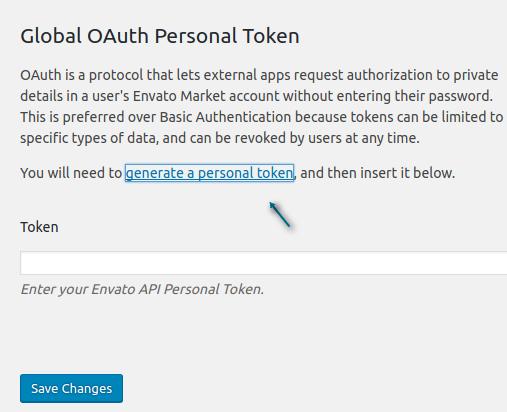
STEP 2: Under Global OAuth Personal Token, click generate a personal token

STEP 3: Give a Token name (Example: ListingPro)

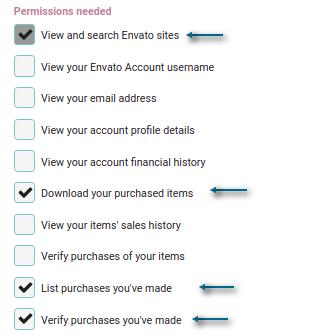
STEP 4: Check if these 4 boxes Permissions were included as shown below.

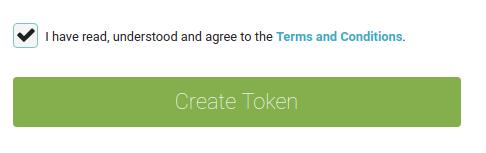
STEP 5: Accept the terms, and click Create Token

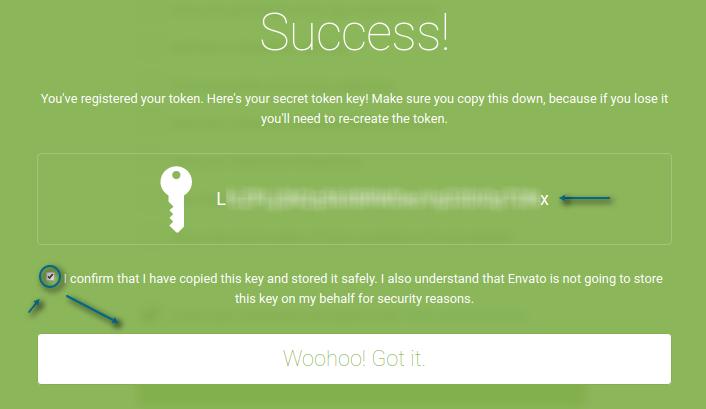
STEP 6: Copy the newly generated token

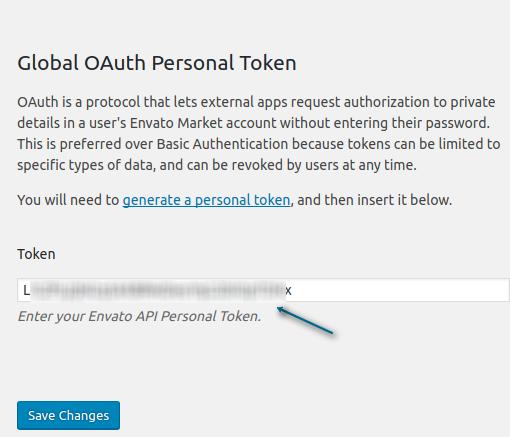
STEP 7: Go back to Envato Market and paste the newly generated token

STEP 8: Click Save Changes

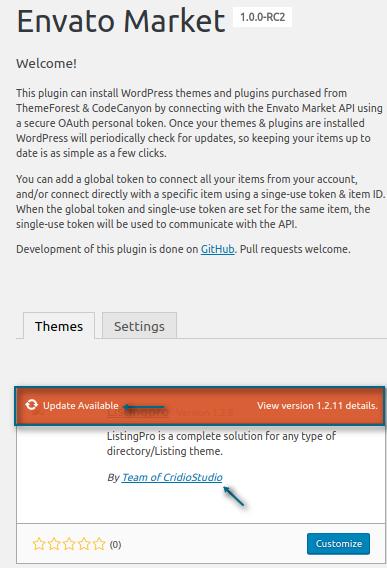
Envato Market plugin will display a notice in your WordPress dashboard when an update is available.

How to move translation to Child Theme?

You will need FTP access to the WordPress site either by using FTP Client or File Manager via cPanelHow to use FTP?


PART 1: EDIT CHILD THEME FUNCTIONS.PHP

STEP 1: FTP into your site. (Example via cPanel or FileZilla)

cPanel is recommended as you can edit the file without downloading it locally.

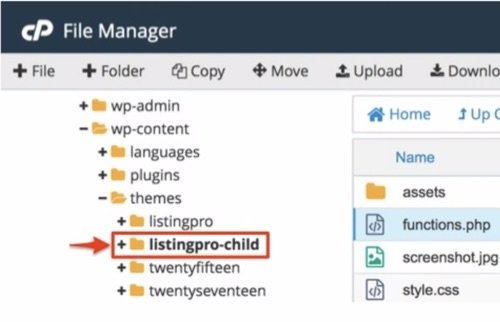
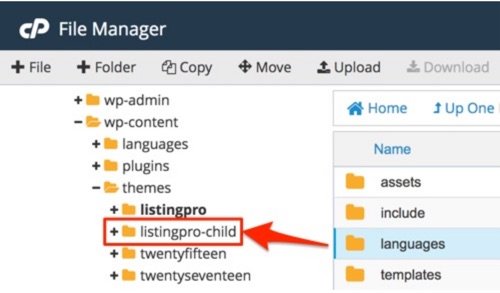
STEP 2: Go to wp-content/themes/listingpro-child/

Make sure first the Child Theme is installed and active.

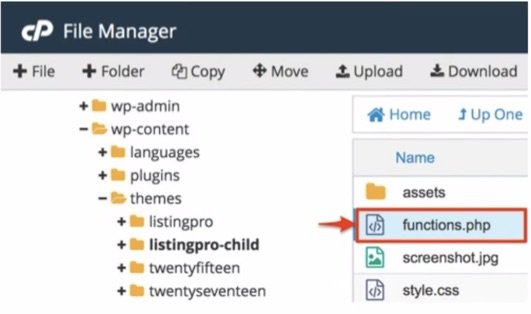
STEP 3: Download and Edit functions.php

If you are using cPanel, simply right-click and Edit the functions.php file.

STEP 4: Copy the code below.

function listingpr_child_lang_setup() {
 load_theme_textdomain( 'listingpro', get_stylesheet_directory() . '/languages' );
 load_child_theme_textdomain( 'listingpro-child', get_stylesheet_directory() . '/languages' );
 }
 add_action( 'after_setup_theme', 'listingpr_child_lang_setup' );

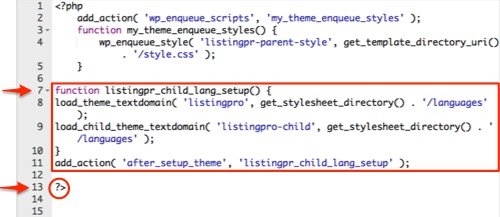
STEP 5: Paste the code into the functions.php as shown below:

Code inserted via cPanel File Manager.
Make sure when you insert the above code from STEP 4, the closing tag ?> is at the end of the file as shown above (in red circle).

STEP 6: Save the functions.php changes to the server.


PART 2: MOVE LANGUAGES FOLDER TO CHILD THEME

You may use Loco translate or Poedit to create or edit translation files.

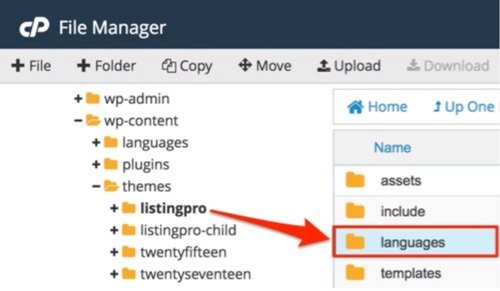
Move languages folder from  wp-content/themes/listingpro/

… To Child ListingPro theme wp-content/themes/listingpro-child/

Congradulations! after completing PART 1 and PART 2 you have successfully moved the translation to Child Theme. Now all the translation you will make in Loco Translate will take effect in the child theme and after the update you will not lose the translation.

STOP HERE! DON’T PROCEED TO PART 3 WITHOUT READING THIS CAREFULLY.

The following step is ONLY FOR USERS who have updated to the latest version of ListingPro after moving the translation to the child theme.

If you have to translate strings included in the latest release of ListingPro, you must repeat these steps in PART 3 after every update.

PART 3: REPLACE OLD .POT FILE AFTER UPDATE 

In case you are unable to find the text strings to translate after updating to the latest version it’s because you still have the old .pot file which is missing the new text strings.

STEP 1: Copy the .pot file from ListingPro Parent theme (Language Folder), /wp-content/themes/listingpro/languages

STEP 2: Paste the .pot file to ListingPro Child theme (Language Folder), /wp-content/themes/listingpro-child/languages.

STEP 3: Go to WP Admin > Loco Translate > Themes > ListingPro Child

STEP 4: Select the language translation file.

STEP 5: Click Sync

STEP 6: Click Save

Now you can translate or safetly update listingpro theme. For more info see How to update ListingPro WordPress theme?

I lost the translation after upgrading, what can I do?

ATTENTION! PLEASE ALWAYS BACKUP BEFORE UPGRADING. WE ARE NOT RESPONSIBLE FOR ANY LOSS.

The typical way to translate a WordPress theme requires that you use .PO and .MO files in the /languages directory of the theme.

Full path to the languages folder is /wp-content/themes/listingpro/languages

However, if you make any edits to a parent theme, including adding translation files to the theme, your edits will be overwritten (and completely lost) once the theme is updated.

Instead, it is best to upload your translation files directly to your child theme /languages folder.

For step by step instructions check How to move translation to Child Theme?